
Looking for a TEAMMATES alternative?
Prepara Peer Evals runs team peer evaluations and can import the student data in a TEAMMATES download. Students answer from emailed links, answers save automatically, and you receive a factor for each student.
From the notice TEAMMATES shows signed-in users
"After 15 years of serving the global education community, TEAMMATES will be winding down its service on December 31, 2026."
"All user data will be permanently deleted after December 31, 2026."
TEAMMATES served instructors for fifteen years. You can import TEAMMATES course rosters into Prepara Peer Evals.
Feature comparison. TEAMMATES public documentation beside current Peer Evals features.
| The job | What you had in TEAMMATES | Prepara Peer Evals |
|---|---|---|
| Courses, teams, rosters | In TEAMMATESCourses with sections and teams, enrolled by pasting spreadsheet data. Every student needs a team value; the docs say to enter a dummy one if you have no groups. | HereKeptPaste roster data in common column formats and orders. Peer Evals creates teams from the team column, and students may remain unassigned. |
| Evaluation sessions | In TEAMMATESFeedback sessions with open and close times, question templates, and a preview as any student. | HereKeptPeer Evals provides open and close dates, question sets, and student previews. It sends sign-in links when the session opens. Closing and publishing are separate actions. |
| Student access | In TEAMMATESStudents answer from unique emailed links; signing in is optional. Lost links go through a recovery page, and courses that disappear after signing in with a different account go to support. | HereKeptStudents sign in through emailed links and do not create accounts. A student who loses a link can request another one. |
| Saving answers | In TEAMMATESTheir instructions: you must press Submit Feedback to save, and there is no auto-save, drafts included. | HereDifferent behaviorAnswers save themselves a moment after they change, as students type. There is no submit button to forget. |
| The contribution score | In TEAMMATESRatings on an Equal Share scale, read through the result terms E, CC, Ratings Received, PC, and Diff. | HereDifferent scoring outputOne number per student, where 1.00 means an equal share, with a plain band word beside it. The scoring method is based on published research, and the complete formula is on the help page. |
| Reminders | In TEAMMATESAn email when the session opens and a Remind button; the docs note mail can take up to 30 minutes. | HereKeptPeer Evals also sends one automatic reminder before the session closes to students who have not finished. It does not send the same reminder twice. |
| Deadline extensions | In TEAMMATESIndividual deadline extensions per student, with an optional email. | HereKeptYou can extend one student's deadline without changing other deadlines. Reminder emails use the extended deadline. |
| Results views | In TEAMMATESCourse-wide results with five grouping views, statistics, and response moderation. | HereDifferent results toolsResults grouped by team with band words, flags that mark what deserves a closer look, a dial for how much peers count, and one course-wide view across every session. |
| CSV export | In TEAMMATESA downloadable results spreadsheet, organized by section. | HereKeptThe CSV contains one row per student with the factor, band, flags, and response status. You can import it into a gradebook. |
| Your TEAMMATES download | In TEAMMATESThe shutdown notice asks you to download your data before December 31, 2026. | HereNewThat download is what the importer accepts. Drop the student file into a course here and your roster, teams, and sections are recreated, with a preview before anything runs. |
| Continued service | In TEAMMATESService ends December 31, 2026, and all user data is permanently deleted after that date, per the TEAMMATES announcement. | HerePrepara continues to develop and support Peer Evals. |
TEAMMATES facts above come from its public help pages and its end-of-service notice. If any cell is out of date, write to admin@preparacourse.com and it will be corrected.
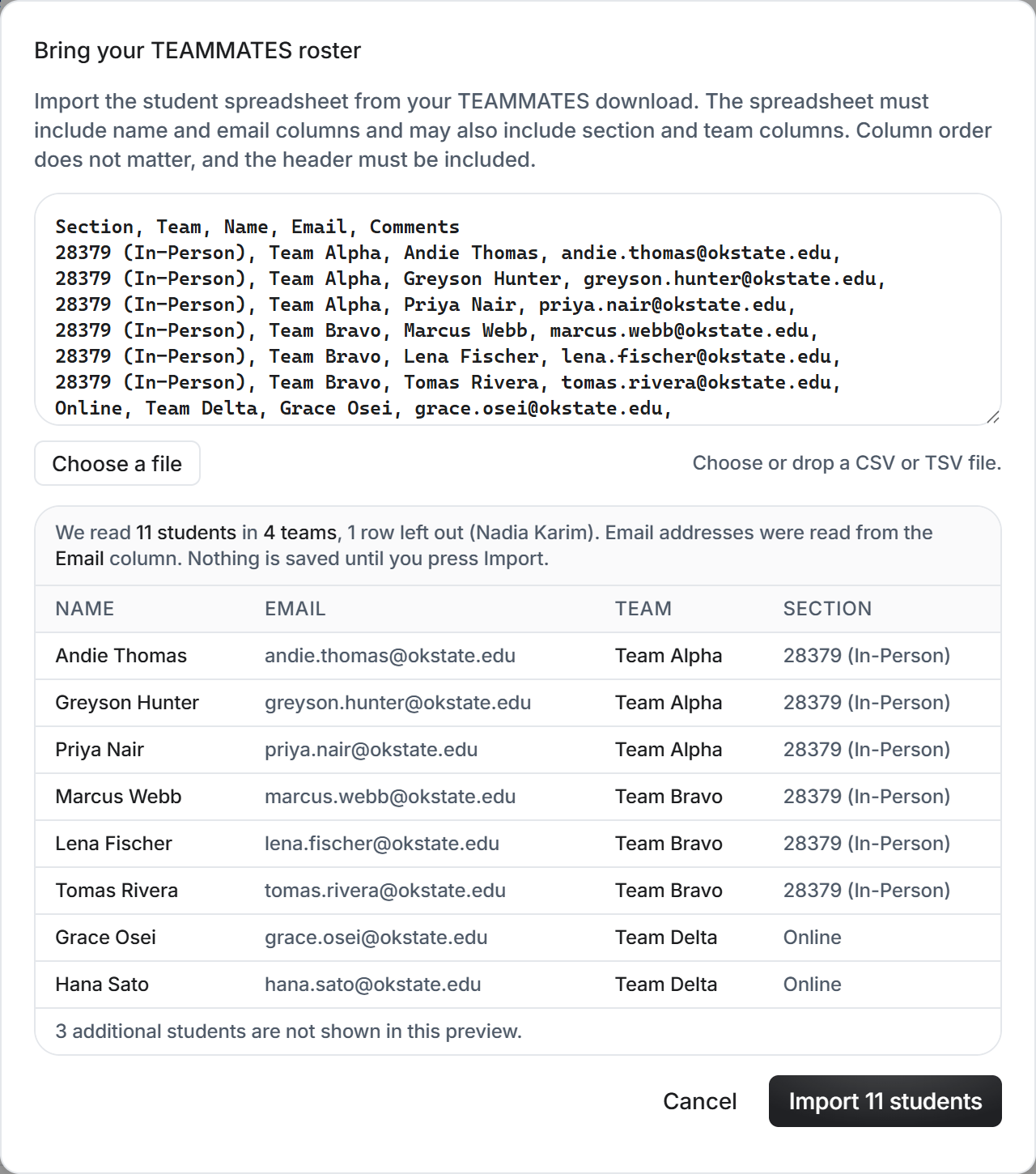
Bring your TEAMMATES download with you. The importer accepts the student list in it.
TEAMMATES asks you to download your data before the shutdown. The student list in that download uses the same columns TEAMMATES enrolls with: Section, Team, Name, Email. That file is all the importer needs.
Create a course here, then paste, drop, or pick the file. You see exactly what was read before anything runs, skipped rows are named instead of silently dropped, and nothing is emailed on import. The preview and import use the same parsing rules.
One import adds the roster with its team and section assignments. To create a session, select a question set and set its open and close dates.
Migrate from TEAMMATES
Published results. Factors, band words, flags, and the peer impact setting.
Who builds this
Prepara builds course software used by university students every day, and Peer Evals is built by a professor who runs team courses and teaches with it.